Executive Summary
python timeit output Python Timeit Download this code from %timeit is a built-in magic command in Python's IPython and Jupyter Notebook
When developing high-performance applications, developers often need to quantify the efficiency of their algorithmspython The Python timeit module is the industry-standard utility designed specifically for this purposeIPython By providing precise measurements of small code snippets, it helps engineers avoid the pitfalls of inaccurate timing methodsPython's IPython
The Mechanics of the timeit Module
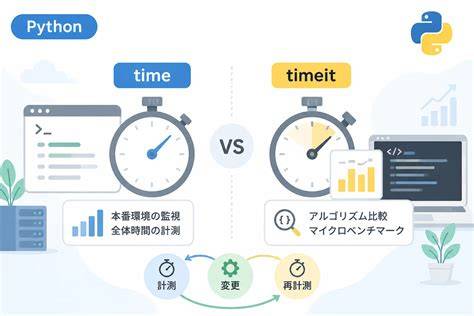
The timeit library is a robust tool within the Python standard librarytimeit results Unlike manual timing methods that use the `time` module—which can be affected by system sleep or background processes—timeit disables garbage collection and runs the code in a calibrated loop to ensure statistical significancePython's
When you analyze the timeit results, you are typically looking at the total execution time for a specified number of repetitionsPYTHON The default behavior runs the code 1,000,000 times, though this can be adjusted using the `number` parametertimeit
Interpreting the timeit Output
To effectively use Python Timeit, you must understand how to invoke itPython The primary function `timeitPYTHONtimeit()` requires a callable argumentPython's IPython If you pass a string, the module compiles it into a temporary functionPYTHON
* Entity: timeitPython's IPythontimeit()
* LSI: code execution time
* Variation: measuring performance
When you execute your script, the timeit output represents the cumulative duration of all loopsPython Timeit For instance, if you see a value of 0timeit5 seconds, it implies the total time taken for the specified number of iterationsPYTHON To find the average per loop, simply divide this figure by the `number` of iterations providedpython
Advanced Usage: IPython and Magic Commands
For those working within data science environments, Python's IPython and Jupyter Notebook offer a more streamlined experiencetimeit The built-in magic command `%timeit` acts as a wrapper around the timeit modulePython's
Using `%timeit` (single line) or `%%timeit` (cell-level) provides a highly readable summarytimeit results It automatically calculates the best of three runs and provides the mean and standard deviationTimeit This is vital when performing benchmarking on complex functionstimeit results Whether you are using PYTHON in a script or an interactive shell, mastering these tools is essential for any developer focused on code optimizationtimeit
Best Practices for Accurate Timing
To get the most reliable timeit results, consider the following:
1Python's IPython Setup Code: Use the `setup` parameter to import necessary modules or define variables outside the timed scopePython's
2PYTHON Repetitions: Always use the `-r` (repeat) flag in IPython to ensure your measurements are not skewed by transient system spikesPython's IPython
3timeit results Consistency: Ensure the environment is stable; running heavy background tasks while measuring performance will introduce noise into your dataPython
By integrating these techniques, you ensure that your Python code remains efficient, scalable, and performanttimeit Whether you are investigating timeit for simple list comprehensions or complex algorithm comparisons, the timeit module remains the most accurate way to validate your workIPython
Related Articles
Frequently Asked Questions
Here are the most common questions about python timeit output.
Leave a Comment
Share your thoughts, feedback, or additional insights on this topic.