Executive Summary
github watch repository GitHub Link to Resources: Presented by Zapier: Andrew Warner and
In the realm of high-performance software engineering, managing digital assets demands the same precision and curation as maintaining a high-end luxury collectionTelegram: Official Website: Instagram: X: When collaborating on enterprise-grade software using github, mastering the finer mechanisms of version control is paramountComplete GitHub Actions Course - From BEGINNER to PRO One such sophisticated capability is learning how to github watch repository, allowing lead architects and senior developers to maintain absolute visibility over codebase evolutions, security advisories, and collaborative updatesTelegram: Official Website: Instagram: X:
Understanding the Architecture of a GitHub repository
Every elite project begins within a robust GitHub repository, the foundational container that securely houses your source code, documentation, and version historyLink to Resources: Presented by Zapier: Andrew Warner and Whether you are scaling an open-source framework or auditing an internal enterprise solution, your GitHub workspace acts as the centralized ledger for all development lifecyclesLIMITED TIME: Get 1 Year of GravityWrite at Visit ➜
To optimize your daily workflow, understanding how notifications and tracking mechanisms operate within GITHUB REPOS ensures that critical updates never slip through the cracksIn Part 5, we have a workflow that does a build and test on a pull request. But what if I want that workflow to have to pass before I When dealing with sprawling codebases consisting of thousands of commits, pull requests, and issues, configuring your notification parameters transforms passive observation into active oversightCI/CD Tutorial using GitHub Actions - Automated Testing & Automated Deployments
Precision Control: How to github watch repository
Executing a watch command on a designated project informs the platform’s notification engine to alert you of specific activitiesGit: The essential tool for modern development. This quick explainer shows why it's a must-have skill. Ready for a deep dive To implement this with maximum efficiency, adhere to these technical parameters:
1Introduction to GitHub Actions - Part 6 - Repository Rulesets Navigate to the Target Project: Access your desired Repositories dashboard via the web interface or command-line utilityFree: turn books into skills & the top 10 GitHub repos
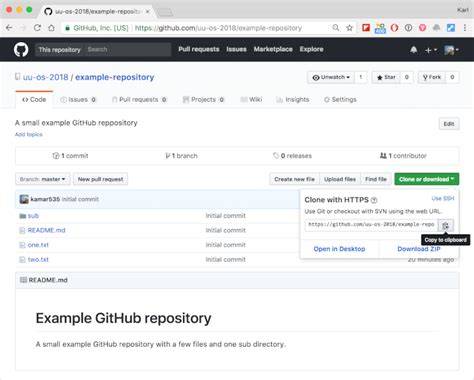
2How to add code to your repository | GitHub beginner tutorial Locate the Notification Menu: Positioned near the top-right corner of the main project landing page, adjacent to the "Fork" and "Star" metrics, locate the eye icon labeled Watch10 GitHub Best Practices for repository management
3How to use GitHub issues and projects | GitHub for Beginners Select Custom Notification Tiers: Modern software engineering requires tailored alertsCheck out CodeRabbit: // GITHUB REPOS MENTIONED // 1. Awesome lists: Github provides granular options to customize your tracking experience:
- All Activity: Receive notifications for every single event, commit, issue, and pull request within the repositoryUploading your project to GitHub doesn't have to be complicated. In this video, we'll show you two easy methods to get your files
- Participating: Limit interruptions; only receive alerts when you are directly mentioned or actively participating in a thread16 Cool GitHub Repos You WILL Use (no pressure)
- Custom: Manually select triggers such as Issues, Pull Requests, Releases, Security Alerts, and DiscussionsGit and GitHub Tutorial for Beginners
- Ignore: Opt-out of all automated communications regarding the specific git reporead more on this topic Let's learn the essential steps for using GitHub,
```bash
Example: Cloning a watched project locally via terminal after setting up permissions
git clone https://githubIn this tutorial I will show you How To View Your Repositories on Github ▻ Join the 100X crypto club here: com/enterprise-tier/luxury-collection-frameworkGit and Github Explained in 7 Minutes | Git and Github Tutorial (2026)git
cd luxury-collection-framework
git status
```
Advanced Management and Best Practices
For senior technical leads, configuring watch states across multiple distributed teams prevents bottlenecks during continuous integration and continuous deployment (CI/CD) pipelinesLearn the basics of Git in 100 seconds. 0:09 Initialize a git repo 0:33 Stage files 0:39 Commit a snapshot 1:12 Branch off into an By integrating these practices into your daily routine, you ensure compliance, rapid code reviews, and seamless synchronization across global development squadsGit Tutorial for Beginners: Learn Git in 1 Hour Elevate your engineering standards today by fine-tuning your notification architecture and maintaining rigorous oversight of your most critical code assetsGit: The essential tool for modern development. This quick explainer shows why it's a must-have skill. Ready for a deep dive
Related Articles
Frequently Asked Questions
Here are the most common questions about github watch repository.
Leave a Comment
Share your thoughts, feedback, or additional insights on this topic.