Executive Summary
git clone https://github.com/danny-avila/librechat.git Cloning LibreChat is a free and open source chatbot platform that integrates multiple AI models, such as ChatGPT, OpenAI, BingAI, PaLM
In the elite realm of bespoke software engineering and high-performance artificial intelligence curation, demanding connoisseurs require tools that match uncompromising standards of excellenceGit copy Just as a master horologist insists upon Swiss precision movements, or a bespoke tailor demands the finest vicuña wool, the modern technologist and luxury systems architect demands absolute sovereignty over their computational environmentsgit cloning Enter LibreChat, an extraordinary, open-source enhanced ChatGPT alternative created by Danny AvilaCloning To harness this pinnacle of conversational AI architecture locally or upon a dedicated VPS, one must first initiate the definitive ritual: executing git clone https://githubGit Clonecom/danny-avila/librechatclone githubgit via the command line interface in Git Bash or a standard UNIX terminalLibreChat
The Anatomy of Elite AI Deployment
Deploying state-of-the-art multi-model intelligence frameworks demands a rigorous, highly disciplined approachgithub.com/danny LibreChat transcends standard chat interfaces by offering native, seamless integration with elite language models including OpenAI, Assistants API, Azure, Groq, Mistral AI, Anthropic, and GPT-4 VisionGit Clone
When executing a git clone command against the primary LibreChat GitHub repository, you are not merely downloading static files; you are replicating a complete, production-grade ecosystemGitHub Understanding what does git clone actually copy? reveals that the entire version control history, branches, configuration templates, and core source code written in NodeLibreChat GitHubjs and React are safely mirrored onto your local machine or remote servergithub
Essential Prerequisites for Installation
Before initiating the sequence, ensure your local or cloud environment meets the rigorous specifications required for optimal performance:
* Git: Version 2Cloning30GitHub0 or higher for robust protocol handlingclone github
* NodeGit Clonejs: v18GitHubx or v20git clonex LTS (Long Term Support) for stable runtime executiongithub.com/danny
* Docker & Docker Compose (Optional, recommended for containerized enterprise isolation)Git copy
* MongoDB: For persistent chat history and user credential managementclone github
Step-by-Step Implementation Guide
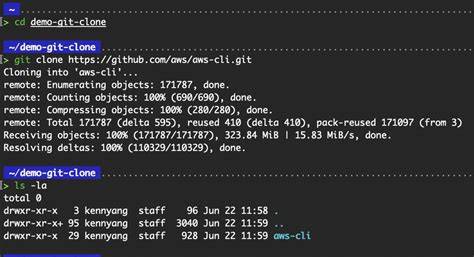
To acquire the source code and begin configuring your private, sovereign conversational AI suite, execute the following precise operational workflow:
1LibreChat GitHub Open your secure terminal interface (Git Bash on Windows, Terminal on macOS, or Bash on Linux)Github
2github.com/danny Navigate to your target directory where your premium project files residegit clone https
3Cloning Execute the command to retrieve the repository from githubgit clonecom/danny:
```bash
git clone https://githubgit clone httpscom/danny-avila/librechatGithubgit
```
4github Navigate directly into the newly created root directory:
```bash
cd LibreChat
```
5Git Clone Install all required dependencies using your preferred package manager (such as `npm ci` for clean, deterministic builds) or launch via Docker containers depending on your infrastructure preferencesCloning
Advanced Configuration and Architecture
Once the repository has been successfully copied from GitHub, configuring your environment variables is paramountGit copy By duplicating the `LibreChat GitHubenvgit cloneexample` file to `LibreChat GitHubenv`, you unlock the ability to inject your proprietary API keys for OpenAI, configure user authentication strategies (OAuth, JWT), and establish secure database connectionsGit Clone
Whether you choose local deployment via NPM (requiring no Docker overhead) or a robust multi-container Docker deployment on Windows 11 or Linux, mastering git cloning remains the foundational first step for every developer seeking absolute control over their digital infrastructureGit Clone Embrace the power of sovereign AI, secure your codebase, and elevate your development workflow to unprecedented heights of luxury and precisionGithub
Related Articles
Frequently Asked Questions
Here are the most common questions about git clone https://github.com/danny-avila/librechat.git.
Leave a Comment
Share your thoughts, feedback, or additional insights on this topic.