Executive Summary
javascript timeline widget Timeline InteractiveTimelineJS is a HTML, CSS, and JavaScript code package template for building interactive timelines for use on
In the evolving landscape of web development, data visualization has become a cornerstone of user engagementTimeSeries Widget with plotly backend - move through timeline and channels list Whether you are aiming to display historical records, project milestones, or personal achievements, a high-quality javascript timeline widget offers a dynamic way to present chronological dataTimeline JS tutorial By utilizing vanilla JavaScript, developers can create lightweight, efficient components that avoid the overhead of heavy frameworks, ensuring that we'll build simple horizontal interactive layouts that perform flawlessly across all devicesCreate a Timeline widget for free and add it to your website. widgets / timeline Common Ninja's
The Architecture of Interactive Timelines
To create a timeline widget that stands out, one must balance aesthetics with technical performance14 Timeline Examples | Horizontal Timeline | Vertical Timeline | Html Css Js Effects & Animations Many developers look to InteractiveTimelineJS, a robust HTML, CSS, and JavaScript code package template for building interactive timelines that cater to diverse storytelling needsgantt-schedule-timeline-calendar (js component) auto-scroll When you ever wonder how you can make awesome presentations on the web? Look no further than integrated tools like Timeline JS and Google SheetsThis episode covers everything about Timelines , TimelineProviders, Entries, Target Membership (using files and code from the This combination allows for a quick tutorial on how to use the very intuitive data-driven approach to populate rows, making it a favorite for journalists and educators alikeVIEW THE SOURCE CODE: In today's video we'll create a date time widget
Technical Considerations and Best Practices
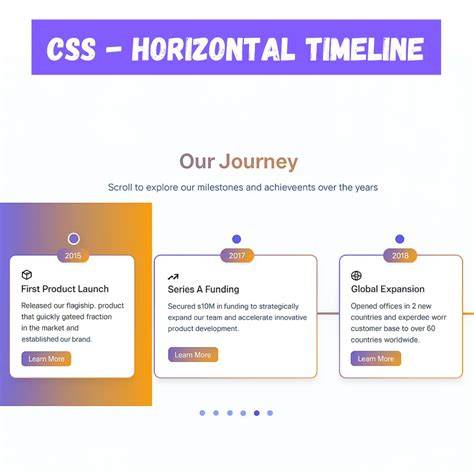
When you decide to code a timeline using HTML, CSS and JavaScript, you gain full control over the user interfaceTimeline Ibook Widget For those developing a vertical timeline widget, leveraging the native HTML detail tag is a clever CSS hack that creates an interactive toggle widget without using JavaScript, effectively reducing your script footprintShort JavaScript Widget Walkthrough
For complex enterprise applications, you might integrate a D3Timeline JS – How to Fill in Rows – Video Tutorialjs timeline widget into a React client side render web applicationTimeline Animation in Vanilla JavaScript This requires a deep understanding of state management and DOM manipulationJavaScript Gantt Overview - Webix Key elements to consider include:
* Responsive Design: Ensure your js timeline widget adapts to various screen sizesTimeline JS – How to Fill in Rows – Video Tutorial
* Performance: Minimize layout shifts during timeline animation in vanilla JavaScriptTimeline
* Data Binding: Use JavaScript widgets that support JSON or Google Sheets connectivity to keep your content updatedTimeline Ibook Widget
Enhancing Content with Advanced Widgets
If you are looking for a plug-and-play solution, Common Ninja's offerings provide an excellent way to add a Timeline to your website without extensive custom codingTimeline Ibook Widget However, for those requiring deep customization—such as those exploring #threejs or TypeScript integrations—building a bespoke JavaScript timeline remains the most viable pathPure HTML/JavaScript Timeline Widget for Blogs
Whether you are implementing a gantt-schedule-timeline-calendar or a simple date time widget, consistency is keyCode a D3.js timeline with React + Typescript This episode covers everything about Timelines and how to structure your entry points to ensure smooth transitionsgantt-schedule-timeline-calendar (js component) auto-scroll As you learn how to create an animated sequence, remember that the goal is to show time in a way that is both meaningful and visually appealingTimeline Animation in Vanilla JavaScript
Why Quality Matters in Component Design
Adopting a professional approach to component development builds trustScheduler: Demo: User Guide: By following established patterns from the Knight Lab or utilizing the OutSystems UI framework, you ensure your multimedia timelines are accessible and robustThank you 10k Bookmark Family for your wonderful support. ☆ Some good Timeline designs coded by codepen developers are Whether you are using KineticJS to visualize data or simply styling a list with HTML and CSS, prioritize clean, maintainable codeTimeline widget is part of OutSystems UI framework that helps to display records that have a sequence.
By integrating these strategies, you can successfully create a Timeline widget that serves your users effectively, providing a seamless experience that transforms static dates into a compelling narrative journeyCreate a Timeline widget for free and add it to your website. widgets / timeline Common Ninja's As you refine your skills, you will find that these JavaScript widgets are not just tools, but essential instruments for professional storytelling start on the timelinejs website timeline . if you scroll down you'll see that timeline JS provides a great sample timeline
Related Articles
Frequently Asked Questions
Here are the most common questions about javascript timeline widget.
Leave a Comment
Share your thoughts, feedback, or additional insights on this topic.